

Salesforce can do almost anything.
You need one thing done well.
Salesforce is the deepest CRM on the market, and it is priced, configured and staffed like it — in US dollars, per seat, on an annual contract. Trace does one job: turn Meta ad leads into closed business, for a flat rupee price, live the same week. Here is the honest comparison, including where Salesforce wins.
A 5-person team pays
₹2,996 / mo
Trace
$125 ≈ ₹12,000 / mo
Salesforce
Time to first lead
~30 minutes
Trace
Weeks, usually a partner
Salesforce
Meta CAPI
Built in
Trace
Custom development
Salesforce
Because we build something real, and real businesses keep paying for it.
Side by side
What you get for your money
Both are real CRMs with pipelines, tasks and reporting. The difference is what you are billed for, and what you still have to build yourself once you get there.
₹2,996 / mo
A 5-person team. Flat, billed monthly.
- Flat price for the team — 2 users included, ₹499 for each extra one.
- Meta Instant Form capture built in, connected during onboarding.
- Meta Conversions API built in — map a stage to an event, done.
- Campaign, ad set, ad name, UTMs and GCLID captured on every lead.
- Form questions become CRM columns automatically.
- Live in about 30 minutes, self-serve. Support included in the price.
- Billed in rupees, cancel any month.
$125 ≈ ₹12,000 / mo
The same 5 users on Starter Suite.
- Priced per user, per month, in US dollars — every seat, every month.
- No first-party Meta Lead Ads connector — middleware or a custom build.
- No native Conversions API — Apex, middleware or an agency builds it.
- Campaign and UTM data only if someone maps it in your connector.
- Each new form question is a custom field, layout and mapping change.
- Days to weeks to launch; past the entry tier a partner is the norm.
- USD list price, annual contract from Pro Suite.
What it costs
Salesforce charges per person.
Trace charges per team.
Salesforce prices Indian customers in US dollars, per user, per month. Trace is a flat ₹1,499/month covering two users, with extra users at ₹499 each. Below is the same team on both, using Starter Suite at $25/user — Salesforce's cheapest paid tier, and the most generous possible comparison for them. Converted at ≈ ₹96/USD.
2 users
3 users
5 users
10 users
20 users
| Team size | | | You keep |
|---|---|---|---|
| 2 users | ₹1,499 | $50 ≈ ₹4,800 | ≈ ₹3,300 |
| 3 users | ₹1,998 | $75 ≈ ₹7,200 | ≈ ₹5,200 |
| 5 users | ₹2,996 | $125 ≈ ₹12,000 | ≈ ₹9,000 |
| 10 users | ₹5,491 | $250 ≈ ₹24,000 | ≈ ₹18,500 |
| 20 users | ₹10,481 | $500 ≈ ₹48,000 | ≈ ₹37,500 |
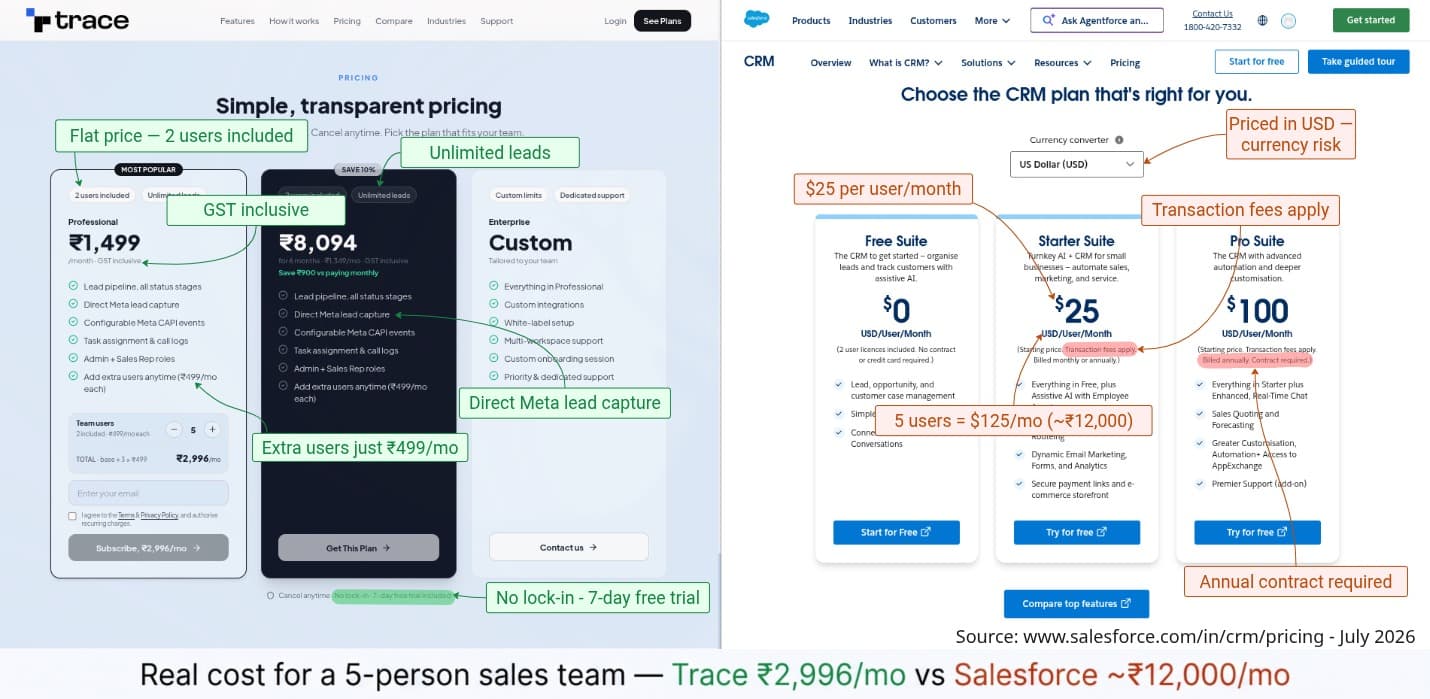
Salesforce list prices from salesforce.com/in/crm/pricing, July 2026, per user per month in USD, shown before 18% GST and converted at ≈ ₹96/USD. Starter and Pro Suite are listed as starting prices with transaction fees applicable; Pro Suite requires an annual contract. Salesforce discounts on volume and term. Verify current pricing on their site before deciding.
Trace, 5 users
₹2,996
Flat monthly price.
Salesforce, 5 users
₹12,000
$125/mo on Starter Suite.
The multiple
4x
And that is against their cheapest paid tier.
Over twelve months, that difference is
≈ ₹1,08,000 back in your budget
That gap is a marketing budget
A 5-person team saves roughly ₹9,000 a month, ₹108,000 a year. Start on the flat plan today, or have us walk you through it first.
14-day free trial · No credit card · Cancel anytime
Their price ladder
The tier you need is rarely the tier you saw
Salesforce publishes a Free Suite and four paid Sales Cloud tiers. The $25 headline is Starter Suite; most growing teams outgrow it the moment they need real automation, quoting or AppExchange access. This is the ladder, and where each rung stops.
per month, whole team of 2
Everything included. Nothing to upgrade to.
2 user licences · no contract, no card
Not at this tier: Two users total, and none of the automation, marketing or customisation in the paid tiers.
per user / month · billed monthly or annually
Not at this tier: Sales quoting and forecasting, greater customisation and automation, AppExchange access, Premier Support.
per user / month · billed annually, contract required
Not at this tier: Premier Support is still a paid add-on. Annual contract is mandatory at this tier.
per user / month · annual contract
Salesforce list prices from salesforce.com/in/crm/pricing, July 2026, per user per month in USD, shown before 18% GST and converted at ≈ ₹96/USD. Starter and Pro Suite are listed as starting prices with transaction fees applicable; Pro Suite requires an annual contract. Salesforce discounts on volume and term. Verify current pricing on their site before deciding.
The differences
Where the two actually differ
Six things that change how much you pay and how much you have to build. Everything else is in the full table below.
How you are charged
Trace: Flat ₹1,499/mo for 2 users, ₹499 per extra person.
Salesforce: Per user, per month, in USD — every seat, every month.
Getting Meta leads in
Trace: Native Instant Form capture, connected at onboarding.
Salesforce: No first-party connector — middleware or a custom build.
Conversions back to Meta
Trace: CAPI built in. Map a stage to an event and it fires.
Salesforce: No native CAPI — Apex, middleware or an agency.
Campaign attribution
Trace: Campaign, ad set, ad, UTMs and GCLID on every lead.
Salesforce: Only what your connector is mapped to carry.
Time to go live
Trace: About 30 minutes, self-serve, with a setup wizard.
Salesforce: Days to weeks; past entry tier, usually a partner.
What lands on the invoice
Trace: Rupees, monthly, cancel anytime.
Salesforce: USD, annual contract from Pro Suite.
Six more differences, or see it live
Thirty minutes on a call is faster than reading the rest of this page. We will show you your own Meta form flowing into a live pipeline.
14-day free trial · No credit card · Cancel anytime
The daily screen
Powerful and overwhelming are not the same thing
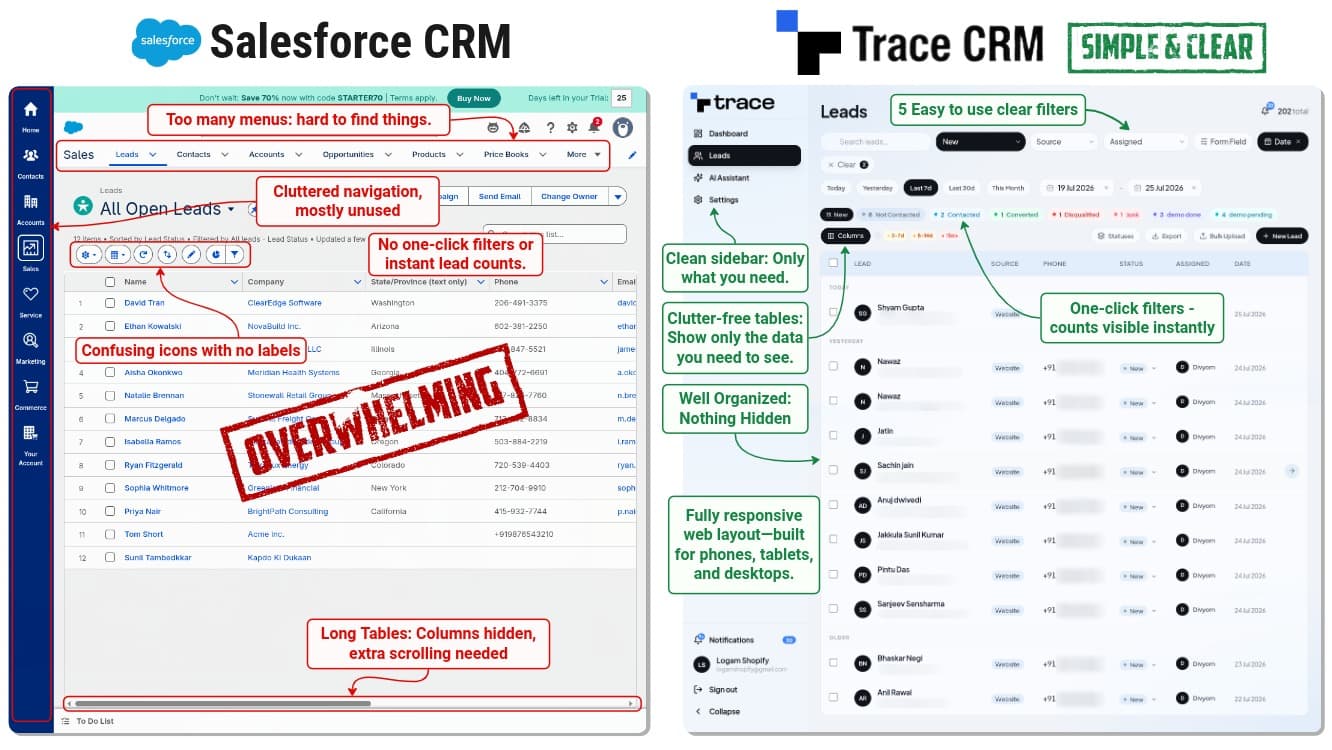
Salesforce's density is a deliberate trade — it serves enterprise sales operations, and for them it is the right call. But your rep opens one screen forty times a day, and every extra menu between them and the next call is a reason not to update the record.
Filters where you can see them
Status filters sit on the leads list with live counts, so "how many are still uncontacted?" is a glance, not a report.
A table that fits the screen
Only the columns a rep needs to make a decision. No sideways scroll to find the phone number.
Nothing hidden in a menu
A short sidebar — Dashboard, Leads, AI Assistant, Settings. New reps are productive on day one, without training.
Put this in front of your reps and see
The screen your team actually uses is the one that decides whether the CRM gets updated. Try it for 14 days, no card required.
14-day free trial · No credit card · Cancel anytime
Feature by feature
Trace CRM vs Salesforce
Where Salesforce genuinely matches us, the row says so. A table that claims a mature CRM can't assign a lead is a table nobody believes.
Meta ads, where the leads actually come from
Built around Meta Ads lead flow
Meta Instant Form leads arrive in seconds
Conversions sent back to Meta (CAPI)
Campaign, ad set & ad name on every lead
UTM, GCLID & click-to-WhatsApp captured
Form questions become columns automatically
Working the leads day to day
Custom pipeline stages & fields
Automatic lead assignment
Duplicate detection
Tasks, callbacks & follow-up reminders
Full call notes & interaction history
Import / export & bulk actions
Role-based access (Admin / Sales Rep)
Analytics & team leaderboard
One-click status filters with live counts
Click-to-Call to your rep's own mobile
Installs as an app on any phone
Depth — where Salesforce is ahead
Quotes, CPQ & approval workflows
Territory management & quota planning
Forecasting & pipeline projections
App marketplace (AppExchange)
Full developer platform & sandboxes
Service, marketing & analytics clouds
Getting started, and what it costs
Set up and running in
Implementation partner normally needed
Priced per user?
A 5-person team pays
Billed in
Annual contract required
Transaction fees
Priority support
Free trial
| | |
|---|---|---|
| Meta ads, where the leads actually come from | ||
| Built around Meta Ads lead flow | Generic pipeline | |
| Meta Instant Form leads arrive in seconds | Third-party connector | |
| Conversions sent back to Meta (CAPI) | Built in | Custom development |
| Campaign, ad set & ad name on every lead | Partial, via mapping | |
| UTM, GCLID & click-to-WhatsApp captured | Partial, via mapping | |
| Form questions become columns automatically | ||
| Working the leads day to day | ||
| Custom pipeline stages & fields | ||
| Automatic lead assignment | Included | Depth by tier |
| Duplicate detection | ||
| Tasks, callbacks & follow-up reminders | ||
| Full call notes & interaction history | ||
| Import / export & bulk actions | ||
| Role-based access (Admin / Sales Rep) | ||
| Analytics & team leaderboard | On request | |
| One-click status filters with live counts | Saved views | |
| Click-to-Call to your rep's own mobile | Paid add-on | Paid add-on |
| Installs as an app on any phone | Native app | |
| Depth — where Salesforce is ahead | ||
| Quotes, CPQ & approval workflows | ||
| Territory management & quota planning | ||
| Forecasting & pipeline projections | ||
| App marketplace (AppExchange) | ||
| Full developer platform & sandboxes | ||
| Service, marketing & analytics clouds | ||
| Getting started, and what it costs | ||
| Set up and running in | ~30 minutes | Weeks + partner |
| Implementation partner normally needed | No | Usually, past entry |
| Priced per user? | No — flat rate | Yes, every seat |
| A 5-person team pays | ₹2,996 / mo | $125 ≈ ₹12,000 / mo |
| Billed in | Rupees | US dollars |
| Annual contract required | No — monthly | Yes, from Pro Suite |
| Transaction fees | None | Apply on Suite plans |
| Priority support | Included | Paid add-on |
| Free trial | 14 days, no card | Free Suite, 2 users |
Salesforce list prices from salesforce.com/in/crm/pricing, July 2026, per user per month in USD, shown before 18% GST and converted at ≈ ₹96/USD. Starter and Pro Suite are listed as starting prices with transaction fees applicable; Pro Suite requires an annual contract. Salesforce discounts on volume and term. Verify current pricing on their site before deciding.
Everything you need. Nothing you do not.
One plan, one price, live in about 30 minutes. If Salesforce is genuinely the better fit for you, we will say so on the call.
14-day free trial · No credit card · Cancel anytime
Switching
Moving off Salesforce
Nothing here needs a consultant. Most teams do the whole thing in an afternoon and run both systems side by side for a week before switching the old one off.
Export from Salesforce
Setup → Data Export, or a report export, pulls your leads, contacts and opportunities out as CSV. It is your data and Salesforce lets you take it.
We import it for you
Send us the CSV on the onboarding call. We map your Salesforce fields to Trace fields and load your history — notes, owners and current stage included.
Rebuild your stages
Name your pipeline stages to match what your team already says out loud, then pick which stages should fire a Meta CAPI event.
Run both for a week
Point your Meta form at Trace and leave Salesforce read-only until the team is comfortable. Cancel when you are sure, not before.
Pricing
One plan. No seat maths.
₹1,499/month covers 2 users and unlimited leads. Extra users are ₹499 each.
Professional
₹1,499
/month
- Lead pipeline, all status stages
- Direct Meta lead capture
- Configurable Meta CAPI events
- Automatic lead assignment
- Full campaign & UTM attribution
- Admin + Sales Rep roles
Start now
Pick your team size and subscribe. Cancel anytime.
No lock-in · 14-day free trial included
FAQ
Questions people ask before switching
Still weighing it up?
Free demo
See both, side by side
Tell us what your team does in Salesforce today. We'll show you the equivalent in Trace on the same call, and say plainly if there's something we don't do.
Book your free demo
We'll reach out within 24 hours.
Same leads. A quarter of the bill.
14-day free trial. Full access. No credit card required.